
One of the key new features of ZenDesk is its live chat option, which allows clients to connect with agents using their computer in real time. From the moment a client opens up the chat window, they are engaged with HACAP.
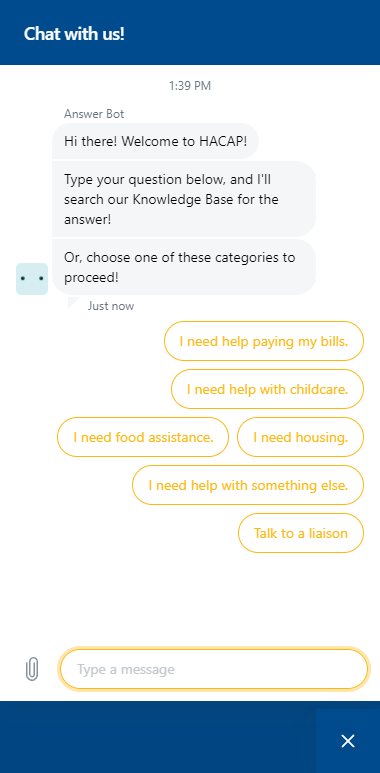
A secondary (but still important) feature that works in tandem with chat is the Answer Bot. Answer Bot is the true first point of contact clients interact with when they open chat, and as such has been developed with numerous automated dialogue options to streamline the process. As it is implemented right now, Answer Bot has three primary functions:
- Using predefined dialogue trees, Answer Bot can guide clients to Help Center articles that outline core HACAP programs.
- If the client has specific questions, Answer Bot can answer these questions by bringing up related Help Center articles.
- And if all else fails, Answer Bot can connect clients to customer liaisons, creating a ticket by gathering information from the client before transferring control over to the liaisons.
Based on information gathered from other community action programs utilizing similar automated chat features, Answer Bot resolves 85% of client requests on its own.
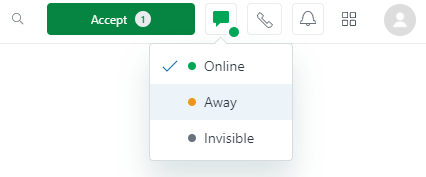
In the event Answer Bot cannot assist a client and they need live assistance, agents are able to connect with clients through the ticket created by Answer Bot (see Understanding Tickets - The Basics). When a new live chat request is started, agents can see the request on the top of their Support screen, as well as their own availability status.

If the agent is offline or marked "Invisible", the chat is put in a queue and cannot be answered until a live agent is available. However, if an agent is marked Online or Away, the option to accept a chat is opened, and agents are put into contact with the the first client in the queue (chats are ordered on a first-come first-serve basis).
Comments
0 comments
Please sign in to leave a comment.