
Ticket assignment in Zendesk is a core functionality that allows for issues to be organized and addressed in a timely and functional manner, and agents can only update tickets that they are assigned to, so it is important for agents to understand how this feature works.
Agents can take ownership of a ticket one of two ways: they can either click on the "Take it" button right above the Assignee field, or they can click on the Assignee field and choose their own name from the dropdown menu. Regardless of how it is accomplished, an agent MUST hit the Submit button when taking a ticket, otherwise the ticket will NOT be assigned to them.
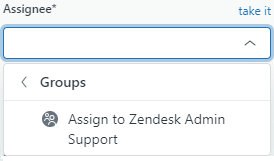
Agents can also reassign tickets to other groups this way. By navigating to the the Groups section in the dropdown, an agent can choose a group to assign the ticket to. Again, this change will only take place once an agent hits the Submit button.
Comments
0 comments
Please sign in to leave a comment.